Home » The PARIS Forums » PARIS: Main » M-Audio follow up question - MTC
|
|
|
|
| Re: M-Audio follow up question - MTC [message #101389 is a reply to message #101387] |
Tue, 02 December 2008 14:53   |
 EK Sound

Messages: 939
Registered: June 2005
|
Senior Member |
|
|
Yep, you can (and IMO should) keep 3.0 as well. 3.01 is brand spanking new to us and we're just starting to document both improvements and quirks here. Your input most definitely welcome!
| senseart wrote on Thu, 07 January 2016 05:20 | When I shut down Paris it doesn't always shutdown in the background and I have to manually do it through task manager in order to restart it.
|
That's weird, I just ran into that same thing on 3.0 over the last few weeks and can't recall this being a documented bug even after 15 years (with the old Chris Thoman drivers, yes - with Mike's drivers, no). I uninstalled a faulty 8i card and installed a couple of new ones and discovered to my surprise that the problem had somehow resolved itself. Related? Coincidence? Unknown. But it's definitely solvable (by definition, since something just solved it).
| senseart wrote on Thu, 07 January 2016 05:20 | | One thing I did do was to play back the same track on both cards...there is a little comb filter/smear to the sound so they are slightly off in timing, but didn't vary. What would someone suggest when importing files across two cards to get that right. Do I have to nudge all the tracks on one of
|
|
|
|
You'll want to take a look at this, which documents different types of PARIS latencies (all small but some large enough to comb filter).
When you've got through that, this is also important reading if you're using plugins.I definitely kept 3.0
Don't think I have a bad card but it's been sitting for years...maybe I'll reseat everything (then I'll have all kinds of issues!)
I can't express enough how grateful I am for this forum and all the users' contributions and efforts to keep this alive, but most importantly the personal help I've received from everyone!
At some point I hope I can begin contributing...so off I go as I have a lot of reading and experimenting to do. I'll spend some time with it and see what I discover...it's great to be back in the saddle!
You all have a great day!
Gary
So I added a second card and a second Mec
Now I have a mec with 16 I/o and 2 adat cards
And another mec with an input and adat card for future use with Kyma
I set it up and it's highly disappointing that the two systems can't talk to one another. It's almost like having two computers with nothing but a sync cable connected.
what do people with outboard reverb do since they can only use it on one submix?
How do people process from one submix to another live? Analog inputs? Smh
A different idea is to just run PARIS ASIO with Ableton, you'll be using the MEC and its I/O straight in Ableton.
Contact Mike, he may let you beta test the new ASIO, he's gotten it down to 64 samples.
I run it in Ableton 9 with PUSH, without any real issues. I usually run it with Studio One and PUSH, via PXT General.
Kerry, I must say I appreciate all the help you give everyone around hereDidn't work for me when I tried it. But maybe it was an operator issue Well thanks KG for your help! I cleaned the contacts on the EDS card anyway and reinstalled the software and it worked! I can't tell you how thankful I am for this site!
I have another question I'm going to also post about submixes and the MEC expansion module. Thanks again!I have two quest
|
|
|
|
| Re: M-Audio follow up question - MTC [message #101391 is a reply to message #101388] |
Tue, 02 December 2008 15:01 |
Don Nafe
Messages: 1206
Registered: July 2005
|
Senior Member |
|
|
ions that I could use some guidance in getting resolved. I've been sitting on a MEC expansion module for a while and never used it because I was concerned about generating a problem with no Emu support. Now that I know about this site, I would like to connect it. Anyone have any tips on what I should and shouldn't do to get it plugged in and operating?
Also, most of my projects thus far did not required very many tracks. Now I'm getting ready to start some major projects that will require more tracks. Following the directions along with trial and error, I have not been able to get the submixes to work. So, I need more than 16 tracks but haven't been able to get additional submixes to play. Again, any tips out there on getting this resolved? Probably an easy one but I'm stuck!Hi again.
Great that you are up and running again.
Just a note about the error 1/1.
Computer cases can be rather flimsy, and some are built to low tolerances.
The EDS card (with daughterboard) is a a large and heavy beast.
Sometimes, the EDS card partially works its way out of the PCI slot with time and vibration, particularly when the system is moved.
Ususally, just reseating the EDS is sufficient to fix the error 1/1. Make sure it is fully home in the socket, by pushing firmly downward. If there seems to be a tendency for the card to slightly lift out of the PCI socket at the back end,(a common occurrence), then a little creative bending of the EDS backplate can fix the problem.
I personally have had to file the screw notch on a couple of my EDS's to allow the card to sit fully seated, once screwed in.
It depends on the construction of the case. (I've had to do this, even with a premium Antec case in the past.)
Hope this sheds some light on what you experienced.
Kim
Thanks Kim! The contacts didn't appear dirty but I cleaned them anyway. I checked the card prior to my post and it was properly seated. It's also very hard to move so it doesn't shift at all. My system can be very unreliable at times and I have no idea why. I've moved several times in the last few years and I've always been very selective in how my PARIS equip
|
|
|
|
| Re: M-Audio follow up question - MTC [message #101392 is a reply to message #101390] |
Tue, 02 December 2008 15:19 |
EK Sound
Messages: 939
Registered: June 2005
|
Senior Member |
|
|
ment is handled. Sometimes it worked after moving and sometimes it didn't. I've even moved it from one room to another and sometimes it still won't work.
Hey I just posted a question about submixes and the MEC expansion module. Do you know anything about either of those?
Hey Kerry I just noticed this thread. Where are you attending for the education that you referenced?Heya Ray! This is my fifth kick at the academic can, after studying performance in bass at Vancouver Community College, Capilano University and the Banff Center at different life stages. I had 20 years off then felt the urge for some "freshen up" so I'm back at VCC, this time working on finishing a BMus in composition. I'm considering charging on to a Master's at Simon Fraser University after.
Yeah, I'm one of the old geezers there now, but a friend of mine once told another friend (a wise old guru of the drums) - "I wish I could go back to school for my Master's but by the time I got it I'd be XX years old...". The old guru said "how old will you be by then if you don't?". Cracked me up, but perfectly true - I'm going to get to XX years old anyway, so I might as well get there with it rather than without it; might as well chalk some things off the bucket list en route.
Any decent music school gives you the most essential ingredients: permission (more than that, a mandate) to take the time off to re-immerse yourself in music, and a concentrated dose of the company of people who are really enthusiastic about digging deeply into it.| Will The Weirdo wrote on Sat, 09 January 2016 09:53 | Kerry, I must say I appreciate all the help you give everyone around here
|
Aw, thanks Will - since whatever I know, and everything I put on the Wiki, I got from folks doing the same either for me or for others, it seems right to pass that along when I can. Big ups to all our contributors here!Heya Ray - first, a few questions about your setup so we can give a bit more focused advice. A simple setup should "just work" so if it doesn't the odds are good that it's just a setting needing tweaking.
______
What computer/OS? How much RAM?
How many EDS cards? How many MECs? It sounds like one of each, directly attached to each other but want to make sure.
What version of PARIS? Which drivers, the originals, Chris Thoman's 2003-ish reboot. or Mike's newest?
How are you getting audio *out* of the MEC into your monitoring setup? From the Master outs (1+2) or the Monitor outs (3+4)?
_____
What's the symptom of the submix not working? Hit "G" then hit "play" - are you seeing audio in the meters, but not hearing it? Or not seeing the expected audio in the meters for that submix?
_____
A note on PARIS' idiosyncratic submixes - when you create a submix you then have to assign it (you do both of these actions in the "Master Mixer" that pops up when you hit "G") to a submix type:
- "card&q
|
|
|
|
| Re: M-Audio follow up question - MTC [message #101393 is a reply to message #101392] |
Tue, 02 December 2008 15:26 |
Don Nafe
Messages: 1206
Registered: July 2005
|
Senior Member |
|
|
uot; (that submix is run "live" through an EDS card, so everything should be audible)
- "native", meaning it's running on the CPU like most other DAWs nowadays - no "PARIS mojo" but should just work
- "virtual" (meaning you will only hear the current contents after you hit "update" - it's really just a stereo render of whatever's in that submix). This could cause you to not hear audio (or - if you've updated the submix previously - to not hear any changes you make until you update it again)
All three types of submixes should play back through the audio outs of your MEC. Basically you use "card" sub mixes until you run out of tracks, and after that choose one of the other two types.
_____
Workflow - you might consider for example putting groups of tracks that you'll work on all at once (submixed vocals; drums) on their own sub mixes, rendering them and leaving them alone while you work on other stuff, using the Master Mixer to adjust their level against the main track, and switching that submix over to "card" when you want to work on it in detail.
- if you need to have all the tracks "live" at once (say your workflow needs you to be tweaking individual levels of lots of tracks all the time) then the "native (CPU)" sub mixes might work best. Watch your levels on this type of submix - this is NOT the same as a "card" submix, which is amazingly forgiving of "going into the red". You do not want to see any red lights on the channel strips, this will give you digital clipping instead of PARIS' nice "analog squish". But handy in a pinch, particularly for "clean" tracks.
- if neither of these works and you absolutely need more "card" submixes, EDS cards are dirt cheap, and they're all you need (you wouldn't for example need a second MEC, the audio from all submixes is internally mixed and appears at the first MEC's outputs anyway). Each one - to a total of 8 (or until you max out the PCI slots on your motherboard, at which point you have to buy an expansion chassis) gives 16 more live tracks to a total of 128.Hi
Anybody would be interested by adding third party apps to the Paris system ?
Thru the existing Dlls exports, it seems quite makeable.
I'd like to make an app like bidule or reaktor (in smaller).
which can take vsts as internal modules, and uses the Paris drivers to handle the audio data and play with all these esp2.
I have the necessary code in my c++ libs for such app.
So i'm talking seriously
The only real trouble is the Paris integration (with dll's h files it'b be real easier though), there I have nothing.
Any feedback ?
Any idea for more Paris apps ?No idea how this escaped me, but you can find it here - http://www.matthiaskronlachner.com/?p=2172
I just checked it out and it seems to work flawlessly on 64-bit Reaper on my MacBook Pro!That sounds really cool actually.
That'll be something I'd be interested in assuming it runs stable with low latency.
As of ideas for apps, I'd say finding a way to make routing between cards possible would be incredible.
The Paris Asio driver would be a big deal but it's still in beta.
A convolution EDS reverb would be great but probably not possibleDoes this DSP product work well with Paris? How's latency, any crashes?
Hello Again KG!
I have a custom computer built back in 2003. I don't recall the RAM but the OS is Windows XP Pro. I have all the packages for it but I just moved so it's not easy to find things right now. I have 1 EDS card and 1 MEC and they are directly connected. Basic setup. I actually just learned recently from this site that more than one MEC or EDS card is possible.
I have the 3.0 version of PARIS. The drivers are the Chris Thoman drivers. My output is coming through the Monitor outs 3 and 4.
W
|
|
|
|
| Re: M-Audio follow up question - MTC [message #101394 is a reply to message #101393] |
Tue, 02 December 2008 15:40 |
TC
Messages: 327
Registered: September 2005
|
Senior Member |
|
|
hat's the symptom of the submix not working? Hit "G" then hit "play" - are you seeing audio in the meters, but not hearing it? Or not seeing the expected audio in the meters for that submix?
It has been a while since I tried it (since it wasn't working for a while) so I don't recall the details exactly but I was following the manual and couldn't get submix audio. I'll try assigning it as you suggested and see what happens.
I guess I'll try the "card" submix but I have not heard of these three options. I guess I'm a bit lost though. Doesn't PARIS come with 128 tracks right out of the box - meaning with one MEC, one C16 and 1 EDS?Great - my strongest recommendation right now, and IMHO your best PARIS investment bar none at the moment, is to spend $50 and download Mike Audet's much newer drivers which superseded Chris' years ago; they even have a simplified installer which makes getting up and running a breeze. Chris' drivers were a brilliant step forward for the platform in the day but we're a decade past that in refinements and stability now.
They are much more modern with significant bug fixes and are in active development (Mike is probably refining them right now as we speak, he's always tweaking the drivers in response to user feedback). But most importantly you'll get direct and active tech support - that thing we couldn't have dreamed of for ages after PARIS' discontinuation.
Not that guys like Mike won't help you on the old drivers anyway! The community always wants to get folks up and running, no matter their system or drivers - but the new ones require far less intervention to "just work" (for example, the old system of having to do complex things to lock the driver to a core is long gone, as are a number of challenging bugs).I'd heard about people using the PowerCore system but I don't have any direct experience myself - anyone out there know anything about it? Satisfactory performance?
Here's some details I found on PowerCore's latency. . Here's what our Wiki research provides.
Modern audio cards and computers have long since been able to get down to 32 samples too, so if those are correct reports it looks like "so far so good" for normal use, like compressing or EQ'ing a bass or vocal track. Obviously using it on a single mic from a multi-mic drum set is still going to introduce phase issues, but you could get around that by routing each mic track through the same type of plugin set to "off" or "bypass" (depending on how the plugin implements "bypass") or "neutral" settings.motherboard recommendations for paris that hold eds cards
i am thinking about building a paris rig againGreetings.
How many EDS cards do you anticipate using?Please could somebody provide an info what pan law is implemented in Paris ? -3, -2.5, 0 ???There's some good info on PARIS' unique pan law here - http://web.ncf.ca/fk824/paris/ParisSenderella.htmHi all,
i have moved too, my paris stuff, i have on 2 different systems, 2 different MB the Error 1/1. In the past, both boards works well with paris. For testing Paris Hardware i am using Win XP at first system. I figured out, that PCI (Bridge)drivers from MB can make some Issus,in the past. But in my case i couldn't be. I am using a system Win 7 32bit with Mikes 1.02 Driver a the second system. Both the same error.....
Someone got an Idee, what it can happend ?
Use System with one EDS ,1x MEC loaded with 2 Adat, 8In 8Out.
Thx
Dan Hmmm... I don't know, you might have a relatively rare hardware failure there. Are any of your internal ribbon connectors crimped or kinked? While I've not seen that specifically with Paris I've seen that be the cause of a "cursed macintosh" which Apple couldn't fix even after first replacing the processor and then the motherboard. Hi Dan,
Take a look at the SCSI connectors on the EDS cards. Look for any damage on the plastic spacers between where the pins go into the connector. A bad EDS cable can short out pins and fry components on the cards.
If this happens, sending the to The at TheSoniq is the only way to fix them.
I hope this isn't the case.
Do the cards show up in the device manager at all, even as unknown devices?
Keep us posted.
All the best,
Mike
Hi mike,
thx for your replay, but the Cards work on a good old P4 system like they do. In my mind, it is something from Win 7 PCI bridge driver. But i don't figured out till yet.
I don't have the time to figure out that, but both boards are Z68 boards with i5 CPU. Some know this one ?
I am looking for a system with min. 4 PCI expansionsboard's,
|
|
|
|
| Re: M-Audio follow up question - MTC [message #101395 is a reply to message #101394] |
Tue, 02 December 2008 15:49 |
Don Nafe
Messages: 1206
Registered: July 2005
|
Senior Member |
|
|
because the solution with expansionschassis haven't run very well.
But at this point i am using the good old P4 with 5 PCI,now.
THX to good Paris community ! Mike for your drivers, you still keep on roling Paris yeahh..
Dan
There were issues with PCI bridge chips on older Intel boards. I'm not sure which series it was or if it affected PARIS.
I wonder if it was those same bridge chips that caused problems with your expansion chassis.
I've had no issues with My Virtua via chassis and a z97a motherboard.
Keep us posted!
Mike
@ Mike,
Z97 boards haven't any 33Mhz Pci slots, thats right ?
DanMine has two!
https://www.asus.com/ca-en/Motherboards/Z97A/
I bought this over a year ago. They may have a newer version.
This looks like a slightly updated version:
https://www.asus.com/ca-en/Motherboards/Z97AUSB_31/
I hope this helps.
MikeI'm using an Asus z97a, and it's been great. It has two PCI slots, but it works with an expansion chassis, too.
https://www.asus.com/ca-en/Motherboards/Z97A/
I hope this helps.
MikeHi All,
I don't know if you heard but, Microsoft is stopping Windows 7 support for Skylake systems on July 17th 2017.
My feeling is that if Microsoft is willing to kick it's Enterprise customers where it hurts to force Windows 10 on everyone, there isn't much we can do that they are likely to care about. They just bit the hand that feeds them. Let's hope the Enterprise customers bite back.
I was speaking with a programmer friend, someone I really respect, about all this, and he made the point that even if Microsoft hired back all of their software testers, they couldn't come close to catching as many bugs as the telemetry is going to catch. I'd rather a slightly buggy system and keep my privacy, but it is something to think about.
I just bought a copy of Windows 10 Education, which allows disabling telemetry, and PARIS and the new ASIO driver are working perfectly so far. I have more testing to do, but so far so good. I'm in the camp of PARIS users that like to stay on current CPUs, so the Skylake thing is a problem for me staying on Windows 7 forever, as much as what Microsoft is doing makes me sick.
I'm thinking really hard about switching to a Mac depending on what they release this spring. If a quad core mac mini comes out, I think my Windows days may be numbered, except to dual boot for PARIS. Even then, I keep thinking about a Mac driver so I can be rid of Microsoft once and for all. Would anyone be interested in that? One would need to spend a fair bit of money on thunderbolt expansion and a PCI expansion chassis. And, it would take a few years.
The ASIO is coming along really well. I'm about half way done the control panel, and then it's done. It's the home stretch. I'm also working on a scherzo update.
Hope all is well with everyone!
Mike
It's been slow around here so I want to say Mike's latest ASIO is working very well in every DAW, I could see a 2016 release coming soon.
I'm sure the PARIS world is waiting for this baby!
So Mike...... what's your plan?I'm upgrading my computer and planning or rededicating myself to mixing everything in PARIS, because it still sounds so damn good.
I've gone through and listened to many of my mixes from PARIS, PTHD, Reaper, Studio One, Live, Reason, FL Studio, SSL 4KE, SSL 4KG, SSL 9KJ, SSL C300, SSL AWS, SSL Duality, API, Neve 80 series, Mackie 8 Bus..... every one of my PARIS mixes still sound great and are very close to my SSL 4K E and G in sound and umph.
So, how are those 4 PCI to PCIe external boards, where you add your own case and power supply, working for everybody? Will they run 4 EDS well?Hi Will,
I was getting a fair bit of time in, and then we all got a cold, and I've had two sick kids at home to look after.
I've got the MEC control panel done. I just have to test the +4/-10 controls. It's hard to check that from remote desktop on a laptop in the car with PARIS running in the house.
Last week, I discovered a bug that I though was squashed wasn't. After finishing the MEC control panel, I started testing all sorts of settings, and With 24 streams of audio, I'm getting occasional audio distortion at 64 samples. By streams I mean 24 I/O ports in use transferring audio on my MEC and 442. I took a look through the voice engine code, and I think I've figured out why.
The core of the voice engine that runs on the EDS card is something called the "big loop." It runs every 64 samples. It does all the memory transfers, and then it checks for new streams to add.
I think the work involved in setting up the 24 streams is delaying the loop by a few samples, and it just carries on at that point, every 64 samples, but slightly late. That puts it slightly out of sync with the main loop in the asio driver.
That's my theory, anyway.
So, I've been working on it. I've almost finished a function to change the frequency of the IRQ firing on the cards. Since the big loop fires the IRQ every 4th loop through the big loop, the IRQ is always in sync with the big loop. I think I've figured out how to make it fire every 64 samples instead of every 256. I can then run the ASIO loop from that.
Other than that, I've just got to do a simple dialog for the 442, and make a couple of additions to the C16 code. There are a couple of knobs I haven't wired in, but it's pretty simple stuff.
That's the latest! I'll get it out the second it's done and working perfectly.
I'm starting to think ahead to the next steps. I'm thinking of attacking the PSCL to port it to 64 bits so we can get a 64 bit ASIO. I'm also thinking about the Mac a lot, given the state of Windows. Reworki
|
|
|
|
| Re: M-Audio follow up question - MTC [message #101396 is a reply to message #101387] |
Tue, 02 December 2008 15:54 |
Don Nafe
Messages: 1206
Registered: July 2005
|
Senior Member |
|
|
ng the PSCL would make it easier to port it to a new OS.
All the best,
Mike
Awesome Work...as always!Sorry for putting you on the spot Mike, lol.
Your updates are inspiring to many of us and your work is one of the reasons I'm rebuilding my PARIS rig, on it's own computer.... I'm searching for parts, planning a PARIS re-evolution in my setup.I had 2 hard drives go out on me a few months back, power surge. I just realized everything PARIS I've collected over the past 16 years is lost. All my skins, videos, efx, manuals, presets, tips, cfg, everything. I did not notice until today, I was planning to set up a dedicated PARIS computer again. Argh, this sucks!
All I have is PARIS 3.0 x64 installer exe.
Can anybody email or dropbox me anything PARIS related to: willtheweirdo@gmail.com
I'm on the PARIS wiki now, getting what files I can, any help is appreciated. FWIW, I don't need anything UAD card related.
Hi all.
I remember a while ago people were running Cubase on a separate machine, using ADAT sync to keep the two boxes locked.
Up until recently, I have been using a Frontier Dakota card on a WINXP machine with no problems.
I have built a newer PC to run Cubase, under WIN7 64bit.
I had problems getting the Dakota running on the new machine.
I purchased an RME 9652 quite cheaply, and the drivers installed fine. Everything is working, except that When Paris is stopped, the outgoing sync causes Cubase to hover around the stop point, but play and stop keep toggling very rapidly. If there is a midi note at the point where Cubase stopped, it keeps endlessly triggering that note continuously, and very rapidly.
This is my first experience with RME stuff.
ave I missed something? Is there a hidden command or config
|
|
|
|
| Re: M-Audio follow up question - MTC [message #101397 is a reply to message #101394] |
Tue, 02 December 2008 15:56 |
EK Sound
Messages: 939
Registered: June 2005
|
Senior Member |
|
|
setting that I have overlooked?
Any insight would be appreciated.
Cheers,
KimI have the greatest respect and admiration for you and the work you have done for Paris Mike
Not too many people would take on such an endeavor
You are the man!I agree, people talk about saving the planet all the time. Your actions have directly lead to the planet being less polluted, as many PARIS users did not trash their systems when ID or CL stopped support a decade ago. In a small way Mike, respectfully, you are an actual hero.Hi Will,
I'm glad that I've made a contribution, but I'm definitely not an environmental hero, as much as I would like to be.
I've been working on the ASIO driver for the last six months from my 2008 Dodge Caravan while my son has his naps. I have to idle the engine the whole time, partly to keep from freezing (this is Canadian winter) but mostly because if I turn off the car, my son wakes up. The car is the only way I can get him to sleep.
I am completely sick of buying things only to throw them out. But to some degree, I keep doing it. To throw out PARIS hardware takes things too far. Keep in mind that I was burnt by Digidesign on the Session 8, and it wasn't going to happen twice if I could help it.
I bought an Energy Star home, but rather than being an environmental triumph, it left me with no respect at all for the Energy Star program. You should feel the draft that comes through my 2013 Energy Star windows. Natural Resources Canada wouldn't even come out to check them, much less do anything about it.
I have a compost bin, but I don't use it in the winter because it's too cold out. I go outside as little as possible in the winter. I do recycle as much as I can.
I would love to be an environmental hero, and I hope that with the PARIS work, I've helped make up a little for the rest of my life!
All the best,
Mike
Hi Kim - no particular insights except to say that ADAT sync between PARIS and a 9652 was running rock solid on my system, although my own system was on a single computer and the slave DAW was Reaper. It should be beatable but I'm afraid I don't have any specific tips - if any jump to mind I'll post right away.I just tracked an album in PARIS and then brought the final tracks into Reaper for fine editing. The client noticed the sound change immediately (and Reaper doesn't sound bad at all) - narrower sound field, loss of "dimensionality".
I asked the mixer how the tracks were working for him. He's using almost no EQ and the faders are all pretty much at unity. Score one for a DAW that just sounds good. Slightly off topic
Have you tried playing white noise to help your son sleep?Hehe. I have problems sleeping in total silence. I have a certain amount of tinnitus due to playing in LOUD bands many years ago. I still gig, but ALWAYS block my ears with rolled up toilet paper. (Readily available at gigs!).
To sleep, I need white noise. In summer I use a pedestal fan, and in winter I use an FM radio tuned off station.
I cannot sleep without some sort of constant wideband noise. It also helps mask external noises in the middle of the night, which wake me up. (My dogs snoring, possums running on the roof, cocks with loud exhausts etc....)
We have a white noise maker that we bought for Isabelle. I'll see if I can use that and turn off the engine once it is warmer out.
I've been working on the ASIO a lot. I've got the main timing loop synchronized with the "big loop" in the EDS firmware. I have to rethink how I handle resynch requests because of missed samples now. I can't just pick any sample position and go anymore. It's tricky because I had to use a larger, circular buffer for the EDS side that is a multiple of ten and two regular buffers for the ASIO side that are powers of two so that Pro Tools could do 24 bit. If Avid could follow the ASIO standard, this would have been done a year ago.
I'll keep you guys posted. This kind of bug is hard because I'm at a play place with my daughter working on the driver from a lap top using remote desktop. I can't hear the output to see if I've fixed anything.
But, I'll check it tonight.
All the best!
MikeHi Will,
I'm dropboxing some zip files to you including skins. I've got some other items. Let me know and I'll zip them to ya.
WayneHi Will,
I've experimented with XP PCI host and Win7 PCIe host and had mixed results. I had a post last year explaining my findings. Here's a quick sample.
With XP all goes well with up to 4 cards external PCI box (PS, MB and generic case) with PCI host card in XP main comp except it can not play well with native inserts. I'm thinking the transferring of data via an old XP (14yrs old) isn't fast enough. Paris locks up. However all EDS board efx seem to be OK. I can barely get a good session with 2 external EDS when using iZotope 4 native mastering plug.
With Win7 and PCIe host card I'm currently running 3 EDS externally (1 kept as backup) and all plays nice and native works fine. I'm now running iZotope 7 mastering plug with 3 external EDS with no problem.
I use the same external 4 PCI slot chassis on both computers. My XP is for tracking (so no native inserts) in studio B and my Win7 is my editing/mixing/mastering machine in studio A.
WayneThank you Wayne, yeah, send whatever you want.I just used http://wetransfer.com for the first time today; works like a breeze for file transfers. Very slick, beats the heck out of email for fast, easy transfers. Wayne, thanks for the info an the files.Will,
So you're dropping the nebula/reaper combo? Nope, Nebula/Reaper with PARIS, are my secret sonic weapons, lol.
I just built a new computer based around an i7 5820K as my main production rig, Audient iD22 for interface.
I have my PTHD rig in it's own computer, and I'm rebuilding an older computer for my PARIS rig.
So I'm running 3 computers for now:
Production/Nebula rig based around Studio One v3.2.
Tracking rig based around PTHD.
Tracking/Mixing rig based around PARIS.
My workflow will be:
Produce in Studio One v3.2.
Track in PARIS and PTHD.
Nebula and Premix songs in Reaper.
Mix in PARIS.
Master in Studio One v3.2 with Acqua.
Total ITB
|
|
|
|
| Re: M-Audio follow up question - MTC [message #101398 is a reply to message #101397] |
Tue, 02 December 2008 16:01 |
Don Nafe
Messages: 1206
Registered: July 2005
|
Senior Member |
|
|
from start to finish, with analogue tape/console like results, putting a fat ass smile on my face.
Over time I will attempt to grab a couple of PCIe PTHD cards and that 4 slot external PCI board for PARIS, and run everything in one computer, with that workflow.
FWIW, I'm also planning to run the i7 computer on a 55 inch 4K screen with a IR touch overlay, sometime over the next 2 years.
Hi All,
I just watched the video demo for the Steven Slate Virtual Mic Pro Collection, and while I wasn't that impressed with the sound of the plugin (as far as I could tell, they mostly just increased the volume), the video gave me an idea.
Maybe you guys are all doing this already, but it was a new idea to me.
In the video, he takes a track, copies it, and then distorts it using his plugin. He uses EQ to shape the sound of the distortion, and then blends it under the original.
I just tried this with the stock PARIS EQ on an acoustic guitar track. I copied the track, used the EQ to pull down a bit of the high end and a bit of the very low end (below 40 HZ), and pushed the trim to plus 15 dB. I then mixed it under the original track. The effect is amazing! It's so full.
I found that putting a high pass filter on set at 40 HZ made the distortion sound better to me.
I'd heard of parallel compression before, but not parallel eq/distortion.
Has anyone else tried this?
Cheers!
Mike I've not tried that in Paris, but it's an old trick for bassists - you want distortion or other effects on your signal but you don't want all your tone sucked out, so you distort a copy of the signal and blend it in to the dry. Sonic Farm's new bass amp which will be hitting the streets in about a month (I have S/N #0001 reserved  ) has both distortion and a wet/dry blend built in. Never thought of trying it on guitars, must check it out!Hi Kerry, ) has both distortion and a wet/dry blend built in. Never thought of trying it on guitars, must check it out!Hi Kerry,
Congrats on the amp!
I think this could be a very powerful tool for getting saturation sounds in PARIS. I'm also pretty excited that it's possible to get different kinds of distortion by changing the EQ. Cutting the very low end changes the sound of the high end of the distortion for some reason.
Cheers!
Mikeso, being totally confused and unsure about this, after reading several conflicting things here on this site, concerning the subject, my plain and simple question is: win.7 pro, 64 bit, quad core: will paris work on this system or not?
also, while i'm at it, i might as well ask, is win.7 a better os for paris than xp, and why should I upgrade to it, if it is, as xp has worked pretty darn nicely for me--- but if win.7 would work even better, then I would certainly like to know about it, before buying a new computer---
any help with any and all of this, any answers at all, MOST APPRECIATED.
thanks so much, folks!
as always, yours most sincerely,
harry e.
I think the ASIO just transitioned from Alpha to Beta status.
I just finished the 442 control panel, which, unless I'm forgetting something, makes the driver now feature complete.
I have a bunch of testing to do for the MEC and 442 control panels (because I can't test everything in the car), and I think I can get the ASIO buffer switches timed from the EDS1000 IRQ, which will reduce CPU overhead at lower buffer sizes.
We're very close.
All the best!
Mike
Yes, PARIS works great on Win 7 x64, I've been running it now for over 3 years, on 3 different computers with 4 installs total. As to the upgrade, that's on your needs. If PARIS is not causing you any problems and your hardware is good, I would not upgrade, follow the rule of If it ain't broke, don't break it. At to the Win 7 vs. XP, I can say having had both for years, Mike's Win 7 drivers and Win 7 is so much easier to install and get working with only a few tweaks for DAW use. Win XP alway took work to get PARIS cooking.
Again, don't break a working system just for Win 7.... but when you do need to upgrade, the Win 7 installation is ready to rock.  Alright that sounds Great to me ! Except I have to admit I am not really sure exactly what that all means. I just appreciate everything done to keep Paris alive and improving. I haven't been recording much lately, I have been doing quite a bit of playing out, but when this new driver is ready to go I will try it. When the driver is ready to try, I would be willing to test drive it a bit, as long as my brain will now how to revert if things to scary. Keep up the GREAT work and keep me in touch, Rich P.S. this is a pix of my new puppy Caesar, I lost my Buddy Samson March 1st. Wow...you are incredible to keep this great platform going!!! Alright that sounds Great to me ! Except I have to admit I am not really sure exactly what that all means. I just appreciate everything done to keep Paris alive and improving. I haven't been recording much lately, I have been doing quite a bit of playing out, but when this new driver is ready to go I will try it. When the driver is ready to try, I would be willing to test drive it a bit, as long as my brain will now how to revert if things to scary. Keep up the GREAT work and keep me in touch, Rich P.S. this is a pix of my new puppy Caesar, I lost my Buddy Samson March 1st. Wow...you are incredible to keep this great platform going!!!
Thanks!We need a Mike Audit Day celebration!a Mike audit day, indeed! what would we all do without mike? thanks so much, mike, for all you do, and for your continuing love and passion for the incomparable paris system. we all owe you a very large debt of gratitude.Hey everyone, just wanted to give all my fellow PARIS lovers a heads up, as something big just happened in the digital audio world.
As some of you know, I'm a big Nebula fan, as I feel they are the best sounding plugin products made. Well 2 days ago Acustica Audio released their first Core 8 product called Pink, in Acqua format. It's an API channel strip.... and it was a real game changer for computer audio. It is the first ever plugin that sounds and works like hardware. In all my 20 years of digital audio working, I've never heard this. It is worth demoing if you use another DAW, but unfortunately it will not work in PARIS.
I'm always a better tool guy and I just wanted to give you all a heads up.
My workflow is:
Produce in Studio One or Live.
Use Reaper to Nebula or Acqua my tracks.
Mix in PARIS.
Master in Wavelab or Studio One.
PARIS and Nebula/Acqua give me such great tone, I no longer miss analogue consoles.Haven't checked in on Asio Drivers for a while. I see there is movement and am exited about that. Much thanks to you Mike for all your work keeping the Paris sound alive and relevant today. I would be happy to be a beta tester! Hi Will -
I've been following the Pink thread on GS and have the demo running too. It's really great. Unfortunately my Window 7 rig died (bad MOBO) and so I don't have Paris up and running currently, BUT I'm wondering if anyone has tried the Blue Cat Audio Patchworks or DDMF Metaplugin as an alternate host for VST plugins. Blue Cat has a 32 bit version, and Harrison Mixbus (which sounds great) has some compatibility issues with some plugs that Patchworks always seems to sort. Just thinking that since it's more current than FFX4 it might allow the use of recently released VSTs (32 bit) within Paris...
TedSorry - should have said I'm a big Nebula fan too - user for at least 5 years...Heya folks - building on Reaper's libsndfile wrapper created by Reaper user Xenakios so
|
|
|
|
| Re: M-Audio follow up question - MTC [message #101399 is a reply to message #101396] |
Tue, 02 December 2008 16:02 |
EK Sound
Messages: 939
Registered: June 2005
|
Senior Member |
|
|
me years back, coder Matthias Kronlachner has now built libsndfile *export* capabilities into the wrapper. You'll find it, free of charge (donationware), over here at Matthias' site, and I'll link it from the "Useful Third Party Software" page as well.
[If you're going to use this software, please do send Matthias a donation here (right side of page, you'll see the link)!]
Matthias' updates to the wrapper (which as you will recall allows Reaper to read PARIS' .paf audio files directly as a native format as if they were e.g. .wav files) now allows Reaper to *write* .paf files as well. Just drop your PAFs into Reaper, edit/tune/process however you like, render them out and import them directly in PARIS once again.
[Why is working with .paf format important when PARIS can work with .wav files? Because .paf is the only 24-bit file format PARIS fully supports. And you never need to worry about stripping PAF files before flying them back into PARIS like we often have to with WAV files!]
You can now take, say, eight tracks of drums tracked in PARIS as 24 bit .pafs, fly them directly into Reaper, edit them using Reaper's cutting edge tools, render them in place, check they have the same names as the original - and PARIS should simply accept them in place of those originals, all without the tiresome mess of creating intermediary wav files. This will certainly be a game changer for workflow over here!
Installation (Win/Mac OSX) is simple - just follow the included instructions. Let Matthias know via his website if you find any bugs.
[EDIT: The default "consolidate/render tracks" settings in Reaper didn't give me working results, but the following settings worked perfectly:
Consolidate to: libsndfile (.au .avr .caf.... etc)
Format: .paf (PAF (Ensoniq PARIS) )
Encoding: signed 24 bit PCM
Byte Order: Little-Endian (Intel Byte Order)
By the way, Reaper also writes "-consolidated" at the ends of all consolidated (i.e. exported) tracks and with the addition of that text, file names can get too long and awkward for poor ancient ol' PARIS to handle, so I used a free and easy-to-use OSX batch renaming utility called NameChanger to trim off the excess.]
Vive PARIS!
- Kerry
[heads up: I've found that each time I update Reaper I have to
|
|
|
|
| Re: M-Audio follow up question - MTC [message #101400 is a reply to message #101398] |
Tue, 02 December 2008 16:04 |
EK Sound
Messages: 939
Registered: June 2005
|
Senior Member |
|
|
reinstall the extension; not a big deal, but if after an update you open a previously working Reaper song and it says "unrecognized file types", just click the installer to reinstall the extension - it takes about three seconds over here]YESSSSSSSSSSSS!
Thanks for the heads up Kerry, I go back and forth between the PARIS and Reaper all the time, this will speed that up big time.As of yesterday, Reaper now fully supports .paf read/write (see sticky)!This is incredible exciting!!
We're going to be able to use Reaper as an ASIO host and import/export 24 audio files from the PARIS app.
Too cool!
MikeSelf explanatory question.
Anyone??
Gonna try three mecs without an external word clock generator. Apparently it has been done successfully.
Cheers,
KimHi Guys,
I have a question and an update.
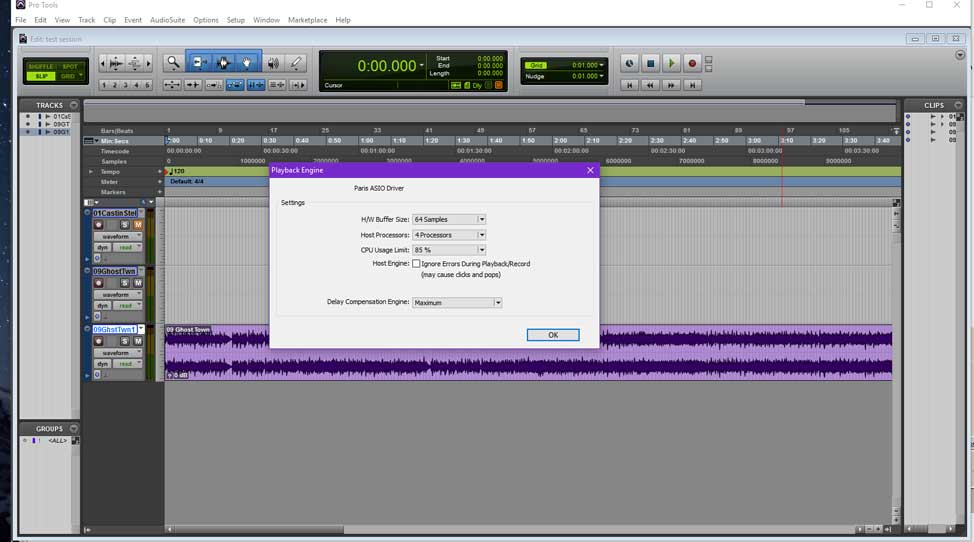
My question: does anyone know how accurate the Centrance ASIO latency utility is? I just ran it on the PARIS ASIO driver, and it reported 1.45 ms round trip latency. Is this in addition to the 1.45 ms (times two) from the buffers? I've included a screen shot. I hope this is true!

My update: I'm working on OSC support for the C16. I've made further improvements on efficiency since getting the main timing loop driven by the IRQ on the EDS card. I'm down to 3.5% CPU usage with dozens of tracks at 64 sample buffers.
OSC is going to be harder than MIDI because I have to manually map every single control. But, I'm on it. I'm targeting Reaper.
I've also got the ASIO driver loading as Windows MIDI driver to pass data for the C16. I'm not sure if it will just pass simple MIDI control messages or something more. I'm leaning towards some kind or partial HUI compatibility so it can be used in Pro Tools 10.
All the best!
MikeLooking good Mike, I can't wait for the finished product, as always great work.Hey - are there any PARIS Mac OS9 users here? There have been several revisions to libsndfile, the library that virtually all modern PC, Linux and Mac OSX apps use to support PAF, and some of them seem to have tweaked PAF compatibility. I'd like to test and see if our old pal the "24 bit PAF rendered from PARIS Mac" bug is still with us. And if it is, I'd like to see if Matthias' Reaper-PAF extension, which has internal settings to change the "endian-ness" (don't ask, but it's the thing that broke it up til now), has now given us a workaround.
If you're a PARIS Mac OS9 user and you'd like to help, I could use a couple of small (two or three second) 24 bit PAF files rendered directly out from PARIS Mac OS9 to test with. Feel free to attach them here, and thanks in advance!Hi Pariscommunity !
I am fully back with Paris and need an external Wordclockgenerator, because i am using 3 MECs now.
What kind of Wordclockgenerator is recommend ?
D'ont say Apogee Big Ben, thats my first choice but it is very expensive  . .
I am intrested in this one and like to know, if it is good enough for Paris :
http://www.thomann.de/gb/art_syncgen.htm
Cheers
DanI use a Lucid Genx6. Solid clock. Only about $100 used. Only goes to 48Khz, but so does Paris, so why pay for extra. Long ago DJ suggested I make sure all WC cables are the same length. Never questioned that advice and the system has always been solid (even after pulling out of mothball after 5 years).
JHI'm using a HOSA 427 that cost me abut $200, if I recall correctly. It looks like they sell used for $50 now.
It works perfectly, but I'd get the Lucid for such a small price difference.
All the best,
Mike Here are others to consider, priced from low to just plain crazy. I would think the ART would work, maybe there is a dealer that would let you try one out first. The more expensive clocks will improve your sound. As I recall, guys here in the past quantified the improvement in sound to be about a 10 to 15% improvement with WCs like the Rosetta over the Paris clock. They were also using expensive high quality cables and D/A converters like the Benchmark, so this is all somewhat subjective in the end.
http://artproaudio.com/wordclock_generators/product/syncgen/
https://blacklionaudio.com/product/micro-clock-mk2/
https://blacklionaudio.com/product/micro-clock-mkiii/
http://tascam.com/products/clock_generator/
http://antelopeaudio.com/pro-audio/master-clocks/liveclock-1 92-khz-master-clock-liveclock
http://antelopeaudio.com/products/search/?s=word+clock&c =
http://www.atiaudio.com/ViewProduct.aspx?CurPage=MCDA112
http://www.atiaudio.com/ViewProduct.aspx?CurPage=MCDA208/WC1 06
http://www.atiaudio.com/ViewProduct.aspx?CurPage=DDA416/WC10 6
Hope this helps!
JamesHi THX too all !
@James, THX for the links !!!!
I have decided, to take ArtSyncGen.
Best Community !
Please let us know how the ART SyncGen works out.
James@James,
of corse !
But i take some time till then, because i have rebuild my studio.
I have designed all Racks by myself and it is not ready now. My roof is a battlefield of 19" equipment .
It seems to be a new "longest day" like Ohama Beach LOL....
I have a lot work, because the wires are everywhere without trs, at least over 200 ends will be soldered.
I will take some Photos, these days !
Best regar
|
|
|
|
| Re: M-Audio follow up question - MTC [message #101401 is a reply to message #101399] |
Tue, 02 December 2008 16:04 |
Don Nafe
Messages: 1206
Registered: July 2005
|
Senior Member |
|
|
ds
DanHi All,
I just sent the first OSC messages from the C16!
The faders are working going from the c16 to Reaper. The next step is getting updates back from Reaper and turning on the up and down LEDs.
If anyone has any requests for how to map the many buttons and knobs on the C16 to Reaper, I could use the help. For example, what should I do with the Monitor Level knob? There is no equivalent in Reaper that I know of.
I'm trying to keep the C16 working in Reaper the same way it does in PARIS. For example, I'm working on having the Channel control knobs and buttons work the same way. I'm also coding to have the mute buttons become solo buttons when the solo button is pressed.
But, what do I do with the data, shuttle, and jog buttons? There are a whole bunch that I'm unsure of.
All the best!
Mike
Yikes - we used to guesstimate this kind of cable work at 15 min/end (you can obviously go much faster but this "builds in" all the other necessary stuff like cable dressing). That's 50 hours of work, or a long week, working full time - make sure you take lots of breaks to stretch!Oh man! How's OSC working for you, is it turning out to be useful?
The jog shuttle wheel would be awesome mapped to similar jog/scrub functionality in Reaper and there are assignable actions for it but it's pre-mapped to something called MultiRotate which I can't find any documentation on. Any idea what that is?
you say it !!!!Hi Kerry,
It's working well. I've now got Reaper sending back messages and turning on the C16 arrow lights. I have a lot of work to do yet, but the basic building blocks are there.
I'm able to make very slight adjustments to the fader positions. The full 1024 values are definitely being sent.
The only down side is that it is a lot harder to work with than MIDI. I have to parse a bunch of strings in the callback. But, it's going to work.
All the best!
Mike
So is this going to be working with reaper with paris in the background?
What's the timeline more or less?
It sounds great. Really great actually. Paris works with its own proprietary drivers but only the Paris app could use them. ASIO is a sort of "standard" driver that will allow most other audio software to use the PARIS hardware so there's no need to boot the Paris app (and in fact I'd be surprised if the Paris app can be run at the same time another app was using its previously dedicated hardware).| mikeaudet wrote on Sat, 30 April 2016 14:38 | Hi Kerry,
It's working well. I've now got Reaper sending back messages and turning on the C16 arrow lights. I have a lot of work to do yet, but the basic building blocks are there.
I'm able to make very slight adjustments to the fader positions. The full 1024 values are definitely being sent.
The only down side is that it is a lot harder to work with than MIDI. I have to parse a bunch of strings in the callback. B
|
|
|
|
There you go again Mike, working out another way to keep PARIS hardware out of the landfills. Reaper running the Paris hardware sounds amazing.
Is it feasible to eventually have the DSP effects work in reaper?
Btw If we're taking request for c16 functions, a mono button and monitor
Switcher would be really useful.Once the buttons output MIDI, retasking them via a script in Reaper should be trivial; Reaper has amazing scripting functionality so the things you're asking for should be pretty easy to execute, although there may be inevitable lag before someone writes the scripts for Reaper that will take advantage of the "extras".
Mike - how many of the buttons or knobs on a C16 will output usable MIDI values? Will the controller numbers be fixed or assignable? None of those would be a deal-breaker (MIDIPipe or the PC equivalent will be happy to do any necessary controller value translation), just curious. Hi N0Samples and Kerry,
N0Samples: I don't see a mono option in the default OSC document, unfortunately.
How exactly does the "monitor Switcher" work in reaper? I haven't seen it yet. I will have the record enable buttons mapped to the record buttons in Reaper.
Kerry: I'm not sure how I'm going to do the midi side yet. But, I'm going to send an OSC message for every button on the C16. It's my understanding that one can map these to commands in Reaper via the "learn actions" dialog. Reaper has the ability to map OSC messages to a subset of these options via a config file. I'm writing one of those files as I go.
A bunch of the buttons on the C16 don't seem to have a clearly corresponding option in Reaper. I could really use some help with this.
For example, if we could get a set of suggestions like "map the dim button on the C16 to the mono button on the master fader in Reaper," I can look into whether it's possible in the OSC config file options. Sadly, there is no "mono" option of any kind in the default OSC config file.
Here's a link to the reaper OSC info.
http://www.cockos.com/reaper/sdk/osc/osc.php
All the best!
MikeHey folks - I just discovered Meyer Sounds's AudioMove and added it to the paf compatibility thread. AudioMove is a libsndfile based (hence paf compatible) batch audio conversion utility for Linux, Mac OSX and WinXP and later. It reads .paf and outputs WAV, OGG, FLAC and AIFF. Although it seems it was last updated in 2009 it works great today - very fast translation from .paf. I'll be contacting the devs to see if we can get .paf writing ability too for the sake of completeness. I'll do some testing to see if we can strip off those pesky BWF headers that PARIS dislikes so much and if it doesn't I'll ask them for it; it'd be a great replacement for StripWav. Just had a very satisfactory email chat with Jeremy, the developer of AudioMove, asking if he could add two PARIS-community-specific features to AudioMove:
1) to add the ability to *write* .paf files to AudioMove as well so it works both ways (also with a checkbox for endian-ness so we can get past the whole Mac/PC 24-bit paf issue)
2) a checkbox to strip off the BWF headers from the .wav files it creates (e.g. so we can grow past having to use StripWav).
Jeremy said they "should be easy enough to add" so he's going to add them in and send me a test executable in the next few days, and if that goes well he'll release an updated version with the new features. Armed with those two additions we'll have a modern batch utility that can handle large amounts of files at once, is scriptable from the command line and neatly bypasses several longstanding PARIS headaches.
Woooot - with the release of de-Paced PARIS 3.01, Matthias's rewrite of the libsndfile extension giving us direct read/write of paf files in Reaper, a great new audio utility to tidy our files, and soon to come, Michael's amazing ASIO driver (you are going to flip when you check it out), 2016 is shaping up to be a great year for PARIS (and it's only May yet)!Very cool! win 7 confirmed here, then upgrade to win 8, still works
check mike audets page for the driver and paris 3 app:
ensoniq.cacool trick!
Asus P8P67 P67 Sockel 1155 ATX Rev3
Thats mine ;D
it has 4 PCI ports!
and needless to say paris works!
asus boards are greatI'm using an Asus z97c, and it's been great. It has three PCI slots.
https://www.asus.com/ca-en/Motherboards/Z97C/
THX to mike ....for Copy and change solution.
I have buyed this one, because Mike told me that and it runs very well !
Best regardshi all
I have breaking volume potentiometer of the mec
that s the ref to replace and repair
thank s
best regards
laurentI don't know what part you'd replace that with - someone with a broken C16 out there want to take it apart and see what it is? But I do know that C16s are about $50 now, with some people just giving them away on occasion, so it's probably going to be cheap enough to just source a replacement on the classifieds.
hi
thank s but phone volume in mec it s analogique ,volume in the c 16 it s numerique
just if someone have a ref to remplace
best regards
laurent
Oh, my bad - I saw "MEC" but I was thinking C16, so that wasn't particularly helpful advice . That's actually probably going to be much easier to solve since there are so many MECs out there gathering dust; anyone got a broken one that they can cannibalize a volume pot from?@laurent,
every Analog pot has got the Ohm-Range at backside. U can buy new ones of your needs, in partshop arround the world. If you don't know how much Ohm you that damegeg one has got, get a Ohm leveler and try to turn the Poti clockwise till the end. Then you can read out on leveler, how many Ohm it has got.
Viva la revolution ! Hope thats right
Hi Everyone,
This is really just a test message to make sure that the new domain works. It's good to be back!
All the best,
MikeI'd call The at TheSoniq.
http://www.thesoniq.com/
He's the only Ensoniq PARIS repair guy on earth, as far as I know.
All the best,
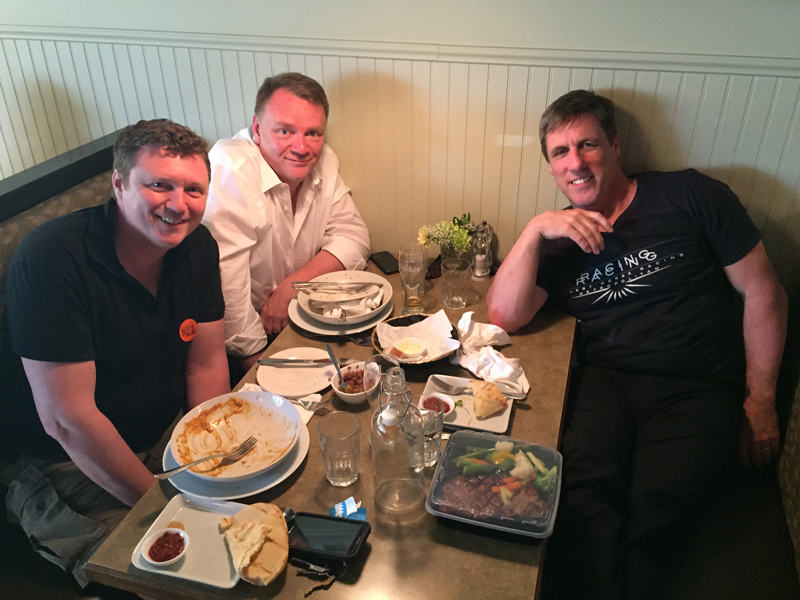
MikeWell it may not look like it in this pic, but I can tell you that Kerry and Mike were working over dinner to get the Forum back up and running.
Kerry Galloway was in town at our annual blues and jazz festival playing bass with Gabriel Palatchi, and Mike Audet drove the 2 hours west from his home town so the 3 of us could all meet face to face after years of online interfacing. What a great day.
BTW - Kerry is one very accomplished musician!
Ted
L to R: Mike Audet, Kerry Galloway, Ted Gerber
hi mike
thank s i can repair
bonne journee
laurentHi Rokuez, I have a GIGABYTE - Socket 1156
|
|
|
|
| Re: M-Audio follow up question - MTC [message #101403 is a reply to message #101400] |
Tue, 02 December 2008 16:24 |
Don Nafe
Messages: 1206
Registered: July 2005
|
Senior Member |
|
|
- GA-P55-UD3L with i7 CPU. It has 4PCI and 3PCIe slots that I was using as a 3 EDS card system under win 7. I switched PCs last year and have this combo for sale if interested.
Thanks
RobertThanks so much for your hospitality, Ted! It was great to see you guys. 
All the best,
MikeHi Forum,
i cannot reach the forum right now. Someone has got the same issue ?Nice to put faces to the names, finally!
Cheers, guys.
Kim W.Hi Everyone,
I have a few updates and a Ardour/Mixbus question:
1) I just got Pro Tool 10 to start Playback with the C16 using HUI emulation. Too cool! There's lots to do, but it's coming along fast.
2) Ardour (and thus Mixbus) is undergoing a major re-write of its OSC subsystem. I've been working on supporting its new OSC subsystem, which will be part of Ardour 5 and Harrison MixBus 4.
But, it turns out that the way the new Ardour OSC subsystem is being implemented is not compatible with the OSC library I'm using for the ASIO driver. I'm not sure how much work will be involved in sorting this out.
Is anyone planning on using this driver with MixBus or Ardour?
3) The Reaper OSC stuff is 99% done. I think I just have to sort out the "Dim" button. I've got multiple C16 support working and two banks. If you have two C16s, they appear as a 32 channel controller to reaper. Pressing the right arrow on the C16 moves them up to channels 33 - 64. The left arrow takes them back to 1-32. It should work this way with as many C16s as you have cards.
All the best!
Mike
Hi Everyone,
I've been looking into log-in problems that some people have been having. I'm able to reproduce the problem on Chrome, but Firefox and IE seems to work fine.
I can't find anything about this in the FudForums site or the forum logs, so i don't have much to go on right now.
For now, we may just have to avoid Chrome until we can sort this out.
All the best,
MikeI have used FF and got some loginproblems, but know i can read the Forum.
If you go on forumshome, or the parispic in header, you will be redirected to Kerrys webpage !I know about the header.
FudForum uses a meta-language to define parts of the page in a template. It them compiles the pages from that template, spitting the same code into a million places, making it impossible to manually edit it.
I could recompile the theme, but I really don't know how the templating system, works, and I don't have a free day to fix it if I break it.
It's not a simple case of finding the right file and editing it, unfortunately.
I'm sure it will get fixed at some point.
All the best,
MikeI just got the faders working in Pro Tools 10. I'm not getting any feedback yet for some reason. So, Play, Stop, FF, Rewind and the first 8 faders are working. I'm not sure how to handle the 16 faders on the C16 vs 8 on the HUI.
Is anyone out there using Pro Tools 10 who wants to work with me on mapping the C16 controls to HUI?
Cheers!
Mike Heya folks - I'm back home after a week or so on the road. I'll buckle down and try to fix the details the site transfer broke. Sorry for the inconvenience!
- KTed and Mike, it was really an enormous pleasure to hang and have a beer after all these years of knowing each other virtually through the forums! Thanks so much for setting this up, it was really a high spot of my tour. And here's to the next time!
- KerryHi Kerry,
welcome back .
Can you give me the link to pariswiki, the link in header d'ont works ?
Can you tell me, in which folder the "untiled Project" is located ?
THX
DanNo problems logging in here on Safari 9.0
tgI just got feedback working for the faders in Pro Tools. I also should have each 8 faders from a C16 showing up as a separate HUI with its own Midi port, up to 16 HUIs. I just have some testing to do.
Cheers!
Mike
Heya guys - I haven't managed to sort out the Wiki link yet; this DNS switch has really cocked up stuff like that. More as I have info - sorry for the delay!Hi Everyone,
I just realized that I probably didn't name the Drum Plate properly. It's really just a small plate algorithm. I've been comparing it to the stock plate, and the small plate sounds so much nicer with a short decay time.
It sounds really nice to my ears with an acoustic guitar. It's a really full sound.
It reminds me of the reverb in Cheap Trick's "Ghost Town."
I think the small room and the drum plate/small plate are my favourites these days.
I've been testing the C16 commands in Pro Tools (HUI mode) with "Ghost Town", and I went looking for the sound of the reverb.
All the best,
MikeHi Mike.
I never picked it, and I 'd say it doesn't matter, as I generally use shorter reverbs.
The Drum Plate is my "go to" reverb for drums and vocals.
It's wonderful. I use the stock plate for a different colour when needed. ("Color" to those up North).
I still haven't purchased the Vocal Plate, but will do so soon, as I'm keen to try it.
Your Class A Amp Sim is gold as well! I also use the Paris Compressor sometimes, but generally run out of DSP, so I have other natives that I use. (PSP Vintage Warmer is usually my tool of choice... I LOVE it!).
Another "go to" is Pseudo. I think it was Chuck's.
Love your work, always...
KimI may be the last!
Attached are two files - a L and R render.
Hope this is of some use.
Let me know if you need any more/anything else.
Regards, Nic.Does anyone know if a Mac version of this is available at all? Should I (humbly) ping ID - or does someone here have an established line of communication and could ask on my behalf?
I'm trying to build a backup PARIS machine - I have so much stuff in PARIS and if I lost my main rig, I'd be in deep trouble (not to mention devastated). Second worst case if no PACE free Mac version is available would be to see if they are still auth'ing the PACE version (I own two copies of the software; only ever registered one)
Absolute worst case is I have to rebuild from scratch each time the 7 day trial period expires  (if disaster struck I could probably live with that) (if disaster struck I could probably live with that)
Regards, Nic.Hi Nic,
Feel free to contact ID about a pace free Mac version, but I don't think it's going get results.
From what I gather, the PARIS application continued to be developed into a new product, probably a law enforcement product, after Emu discontinued the hardware. I'm not sure if ID even has the code as it was at the time of 3.0's release to produce a PACE free version.
To my knowledge, the PACE removal utility was never released for the MAC, so there is no way to remove the PACE code from the existing MAC version, even it if is legal in your jurisdiction.
ID has publicly stated that they will no longer provide response codes for PARIS 3.0.
My advice is to get a PC. PAR
|
|
|
|
|
|
|
|
|
|
|
|
| Re: M-Audio follow up question - MTC [message #101415 is a reply to message #101414] |
Wed, 03 December 2008 03:05 |
Don Nafe
Messages: 1206
Registered: July 2005
|
Senior Member |
|
|
c ?
The question n•2 is : can a Mec and a 442 be linked and work together ? (So that I would have 8i/o) don't think it would but I have to ask
For the story :
I am currenltly student in an audio school, so we are Protoolised each day (I bet you knew) but, after 10 years working with Paris, it takes me 1 hour to have a "cool roughmix" with Ensoniq Paris, and 6 hours to have a "cool not even better roughmix" in PT with all the Fu..in great UAD plugs.. So ! It's cheaper, it's easier, it works better, I just need more faders !! Help
Cheers
E
Hey everyone. Thanks for adding me to the forums.
I landed an EDS1000, MEC and C16 over the weekend and had aspirations of running it under OS9 on mac. Is there any way to install Paris on a mac (g4 I reckon) now that Int Devices are no longer issuing response codes?
Or is a windows based system now the way to go? It pains me to say it as a long time mac user but yes - for someone setting up a Paris rig in 2016 there's no question. PC is now definitely the way to go for a host of reasons, not merely because of the impossibility of getting a license code from ID, or because of Paris development itself, but also because there's a number of other possibilities that third party development has enabled. You should be able to get a basic PC that will run Paris for free, or next to it.
Well that is upsetting to hear, as I really wanted a nice little 'legacy' OS9 rig running a bunch of old goodies like Digidesign Turbosynth & some other old mac stuff. In all honesty, having three computers (main mac PT12 rig, Mac OS9 plus a windows 7 computer) is probably not practical for me... as much as I would like to give Paris a spin.
On a side note, I did email Intelligent Devices a few days ago. Joshua from IT replied and said "Unfortunately, the only support we are currently offering for PARIS is challenge response codes for original purchasers."
I can understand why they wouldn't sell new copies of Paris software, as it probably carries some sort of legal requirements to maintain it. But hopefully it means I can tee up some kind of license transfer from the original chap who I
|
|
|
|
|
|
| 2 Audio Cards sharing computer [message #101417 is a reply to message #101387] |
Wed, 03 December 2008 04:05 |
Don Nafe
Messages: 1206
Registered: July 2005
|
Senior Member |
|
|
ace, so you can see if anyone here can email or mail you a copy of it. I maybe wrong, but I believe PACE free PARIS 3.1 was released, contact Mike Audit on that.
I will say that down the road you should really switch to a PC for Paris because Mike Audit has fixed many issues with the Paris plugins and he is continuing to develop Paris on the PC side. With Mike's windows drivers you can use a system with more processors and more RAM. Mike's development of ASIO drivers for the Paris hardware should be even more compelling. In addition to running the paris software, you can run Pro Tools, Reaper or many other DAW softwares on the paris hardware and utilize the I/Os and the C-16 control surface. In short, Paris is still being developed and improved upon today, thanks to Mike Audit!
Check out mike's site.
http://www.ensoniq.ca/catalog/
I hope this helps
JamesI think your on to something with the Apogees and the Benchmark. Long time user "DJ" had the benchmark and as I recall, he quantified the sound improvement around a 15% or more improvement. He may have also had the Apogee. Someone here must have blazed the apogee trail in the past. I also think a newer Clock would likely improve the overall sound of Paris.
JamesHi All,
I just compiled my first build of an installer for the ASIO driver package. I'm going to test it over the next few days. If all goes well, I'll release it right away.
All the best,
MikeYou bloody ripper!! (said with an Australian accent...)Mike,
We need a "Like" button!
|
|
|
|
| Re: 2 Audio Cards sharing computer [message #101418 is a reply to message #101417] |
Wed, 03 December 2008 06:26 |
EK Sound
Messages: 939
Registered: June 2005
|
Senior Member |
|
|
Don Hi There.
I just tried to post a detailed reply to your post, only to have it lost, because the forum bumped me off after about 20 minutes.
In a nutshell, You are onto something.
Paris has some mojo going on that makes it easy as hell to get good sounding mixes, even rough ones.
Your best bet is to get yourself a Mec, and a second EDS card.
Yes, you can have a 32 track mixing environment with two EDS's and an IF442, but you cannot run a MEC and an IF442 together on a single EDS card.
A MEC with one 8 input card will give you 12 recordable tracks on your first EDS, and your IF442 will give you an extra four recordable tracks on your second submix/EDS.
Hope this helps somewhat.
Kim
Hello Kim,
Cool !
I'm quiet sure I'll follow your advise with a MEC and a second EDS card. At last it will be the easiest way to enjoy PARIS and it's best.
Thank you a lot !
Best
Emma
We need a "Mike Audet" holiday!I just read this entire thread again from scratch, Mike you're a legend! I look forward to the release "soon" Thanks so much, Amuse! I got a nasty cold a week ago Friday, and it's been hard to shake. It's slowed me down a bit. But, I haven't had a single issue with the driver myself in over two months of testing. I'm so excited to finally get this out.
I know that soon is a loaded word around here, but this is definitely happening!
All the best!
Mike
@Mike
when you will sell the driver on your page ?Hi Daniel,
I'll have it up as soon as I can.
I've tested the installer on Windows 10 64. I have to test on a 32 bit Windows as well as Windows 7 64. I've found a couple of minor things that I just fixed
|
|
|
|
| Re: 2 Audio Cards sharing computer [message #101419 is a reply to message #101417] |
Wed, 03 December 2008 07:31 |
Tom Bruhl

Messages: 1368
Registered: June 2007
|
Senior Member |
|
|
- The version number and year on the scherzo driver were wrong. They're fixed. I also have to write a simple readme file.
I'll aim for next weekend. It's the very final stretch.
All the best,
MikeGreat ! to read this .... and now in German JUBEL,FREU,GEIL.........(english: happy, joy, wicked)I've been working on something half way between a readme file and a manual. I'm not trying to cover every little detail, but I'm hoping it gives enough information for all the features to be found and used.
One thing I haven't done is map out every C16 button and what C16 modes they work in. I'm hoping this won't be necessary. The faders, mutes, soloes, transport, and jog wheel work in all of them. Reaper OSC has a signal for every button. It just wasn't possible to map them all to Mackie equivalents (HUI and MCP) because the control surfaces are just too different. I did my best.
If anyone has time to look it over, this is what I have so far.
I'm going to test the installer on an 32 bit Windows this weekend. It's working great on 64 bit Windows.
All the best!
MikeAs always Mike, If you need Win 7 x64 testing, shoot me an email.So if i run Win7 64 bit can run Paris 2.2
What are the differences with 3.0?Really looking forward to the Asio driver!I found a small bug in the installer that related to 32 bit installs. It's fixed. I just added a warning dialog for when there is no interface on the master card. One beta tester is having a bit of trouble with the installer, and he's very kindly checking out the registry entries to see if I made a mistake.
It's the very final stretch.
I'm listening to 54-40 through Soundforge Audio Studio 10 right now. The PARIS hardware sounds beautiful.
All the best,
MikeI'm looking for PARIS information and I can't seem to find the PARISwiki, anybody got an active link?Heya Will - that's my bad. We changed the DNS and broke the links. I'm still looking for a fix for it. Ok,
Quick question.... I just rebuilt my PARIS rig including new hard drives. I have a project loaded but it will not let me set my record path on the boot or audio drive. Can PARIS use NTFS drives for audio?
Any guess what my problem is?
It's easily been 10 years since I messed with a PARIS hard drive issue.Hm, interesting - I have no idea if PARIS can talk to NTFS formatted drives. Manual's no help, it predates NTFS by years. Try pointing it at a FAT formatted drive and see if that works?I just formatted the drive to FAT32 and it still will not let me set a record path.... argh!
I had forgotten these type of PARIS headaches, lol.
Any ideas?I had to allow permissions.... it's working
|
|
|
|
|
|
|
|
|
|
|
|
|
|
Goto Forum:
Current Time: Wed May 06 13:02:06 PDT 2026
Total time taken to generate the page: 0.13242 seconds
|
 The PARIS Forums
 Search
 Help
Help Members
 Register
 Login
Login Home
Home